In a basement supermarket the reception tends to drop exactly when you need the list. Brauchma keeps your lists on your phone and simply carries on without a connection. What you change offline stays on the phone and follows as soon as you have reception again.
What works without reception
- Opening Brauchma and seeing the last known state, also after a restart of the phone.
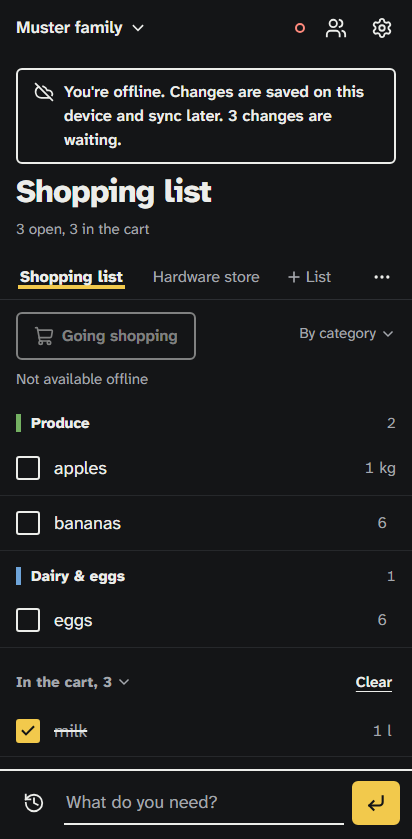
- Adding, editing, checking off and deleting items, and clearing the cart.
- Opening "Bought before" with what your phone has kept of it. Without reception that can be fewer items.
A banner tells you that you're offline and counts the changes that are waiting. A dot in the app's header shows the connection state. So you always know whether the family already sees your changes.
When reception returns
Brauchma sends the waiting changes to the server in order and shows that it's syncing until it's done. After that the whole family sees what you checked off or added. If two people changed the same item, the last change wins for each field. If someone deleted an item while you edited it offline, it stays deleted.
What needs a connection
Invitations, creating, renaming and deleting lists, family changes and the language setting need the server. Without reception they are disabled, with a short note. "Going shopping" needs a connection too, so tell the family before you walk into the dead zone. Signing in with Google needs reception as well, but only once: after that you stay signed in on that device.
If you sign out while changes are still waiting, Brauchma tells you first how many will be lost and asks you to confirm.
Getting the most out of it offline
- Put Brauchma on your home screen. It then opens with one tap like an app, even without reception. Use Chrome on Android and Safari on an iPhone; the home page shows the steps.
- Open the list shortly before you leave. Offline, Brauchma shows the state your phone saw last. With reception, the latest state arrives on its own.
- After a long break, open it once with reception. Your phone discards an offline copy that is older than 30 days. If you haven't opened Brauchma for that long, it loads your lists again the next time you have reception.
Shopping together, even in a dead zone
In Brauchma, offline isn't an emergency mode but the normal case in the store: two of you can shop, both check items off, and as soon as you have reception again, the list matches on both phones. How your family gets onto one shared list is in Share a shopping list with your family.
Brauchma is free and open to everyone. Open the app, sign in with Google and invite your family.
All the details about offline use are in How it works.